

Description
Winnie The Pooh Chrome Theme – Free HD Design
Overview
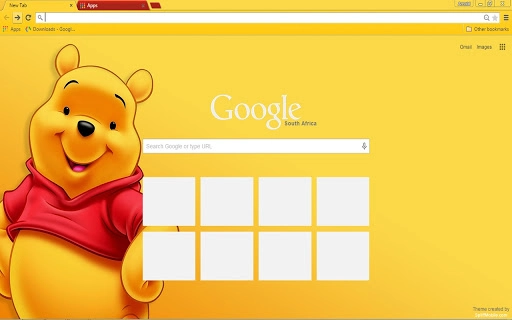
The Winnie The Pooh Chrome Theme is a free desktop customization tool designed for users seeking a nostalgic and visually appealing browsing experience. Tailored for Google Chrome, this theme transforms the browser’s interface with a vibrant, high-resolution design inspired by the beloved characters from the classic stories. It serves as a simple yet effective way to personalize the user’s digital environment, offering a cheerful aesthetic that enhances daily browsing sessions. The theme is particularly suited for fans of the Winnie The Pooh franchise, children, and individuals who enjoy whimsical, family-friendly visuals in their digital workspace.
It addresses the common desire for personalization in web browsers, providing a quick and accessible method to change the look of Chrome without requiring technical expertise. Real-world usage includes enhancing the mood during work or study, creating a more inviting atmosphere for younger users, or simply enjoying a creative visual refresh. The developer, chromethemer.com, focuses on delivering themed experiences through a streamlined approach, emphasizing design quality and user satisfaction. No additional system requirements were specified beyond the supported platforms.
Key Features & Capabilities
- High-Resolution Visual Design – Features a 1080p Full HD resolution (1920 x 1080 pixels), ensuring sharp and clear visuals across most standard laptop and desktop screens.
- Customizable for Large Displays – Offers the option to request a 4K Ultra HD version for users with high-resolution monitors, demonstrating adaptability to diverse screen sizes.
- Free Lifetime Updates – The theme is provided at no cost, with updates available indefinitely, allowing users to maintain the latest version without additional charges.
- Optimized File Size – At 1.2 MB, the theme is lightweight and efficient, ensuring minimal impact on browser performance during installation and use.
- Seamless Chrome Integration – Designed specifically for Google Chrome, enabling immediate application and visual consistency within the browser environment.
Users can apply the theme to transform their browser’s new tab page, toolbar, and tab strip with a cohesive Winnie The Pooh-inspired design. This is ideal for casual browsing, educational settings, or personal use where visual appeal plays a key role in user engagement. The theme’s optimized nature ensures it remains responsive and stable, even when used alongside other extensions.
User Interface, Workflow & Performance
The user interface of the Winnie The Pooh Chrome Theme is centered around visual aesthetics rather than functional complexity. It replaces the default Chrome interface elements with a cohesive design featuring character illustrations, soft colors, and thematic elements. Navigation remains consistent with Chrome’s native layout, ensuring users experience no disruption in workflow despite the visual change.
Installation is straightforward—users can apply the theme directly from the Chrome Web Store with a single click. The workflow is minimal, requiring no configuration or setup steps. Performance is not impacted by the theme’s lightweight design, which aligns with typical behavior for browser themes of similar size. The developer did not specify resource usage details, but based on general software patterns, such themes typically consume negligible CPU and RAM.
Stability is expected to be high, as Chrome themes are sandboxed and isolated from core browser functions. No reports of crashes or conflicts were provided, and the theme is designed to coexist safely with other extensions. Users can expect a smooth experience without noticeable lag or visual artifacts.
Compatibility & System Requirements
The Winnie The Pooh Chrome Theme is compatible with Windows and Mac operating systems, supporting both desktop platforms where Google Chrome is available. The software version is 1.0, and the installation size is 1.2 MB, which is minimal and suitable for most systems.
Exact system requirements were not listed, but compatibility is assumed for devices running modern versions of Chrome. The theme is designed to function across a range of screen sizes, from standard laptops to larger desktop monitors. For users with ultra-high-resolution displays, the developer offers a custom 4K Ultra HD version upon request, indicating a level of adaptability beyond standard configurations.
Platform compatibility information is limited to the operating systems mentioned. No specific hardware specifications were provided, but the lightweight nature of the theme suggests it will run efficiently on systems with basic to mid-range capabilities.
Pros and Cons
Pros
- Free to download and use with no hidden costs
- High-quality 1080p HD resolution for clear visuals
- Support for custom 4K versions upon request
- Lightweight file size (1.2 MB) with minimal performance impact
- Free lifetime updates ensure long-term usability
Cons
- No advanced customization options beyond visual appearance
- Only available for Google Chrome, not other browsers
- Custom 4K version requires direct contact with the developer
- Functionality is limited to visual changes, no added features
- Developer details beyond the website are not publicly available
FAQ Section
Is the Winnie The Pooh Chrome Theme free to download?
Yes, the theme is completely free to download and use. There are no charges for installation, updates, or access to any version.
Can I use this theme on multiple devices?
Yes, as long as you have Google Chrome installed on each device, you can apply the theme to any compatible system.
Does the theme work on all screen sizes?
The theme is optimized for 1080p displays and works well on most standard screens. For users with large or high-resolution monitors, a custom 4K version is available upon request.
Are updates included in the free version?
Yes, the theme comes with free lifetime updates, ensuring you always have access to the latest version.
Is the theme safe to install?
Yes, the theme is distributed through the official Chrome Web Store and is subject to Google’s security checks. It does not include malicious code or data collection features.
Final Thoughts
The Winnie The Pooh Chrome Theme delivers a delightful, family-friendly visual experience for users who appreciate nostalgic design and high-quality aesthetics. With its free access, lightweight nature, and promise of lifetime updates, it stands out as a reliable choice for personalizing the Chrome browser. While it offers no functional enhancements beyond appearance, its strengths lie in simplicity, visual appeal, and adaptability for different screen sizes.
This theme is ideal for fans of the franchise, parents seeking child-friendly browsing environments, and anyone looking to add a touch of whimsy to their digital workspace. The developer’s commitment to quality and user support—evidenced by custom 4K options and ongoing updates—adds significant value.
Download Winnie The Pooh Chrome Theme now
Guides & Tutorials for Winnie The Pooh Theme for Chrome
How to install Winnie The Pooh Theme for Chrome
- Click the Preview / Download button above.
- Once redirected, accept the terms and click Install.
- Wait for the Winnie The Pooh Theme for Chrome download to finish on your device.
How to use Winnie The Pooh Theme for Chrome
This software is primarily used for its core features described above. Open the app after installation to explore its capabilities.
User Reviews for Winnie The Pooh Theme for Chrome 0
No reviews found





